Settings
Your name and language, your energy contract, security and API keys in one place.
Under Settings you manage your account and the details that determine how we calculate your figures. The page is split into a few cards.
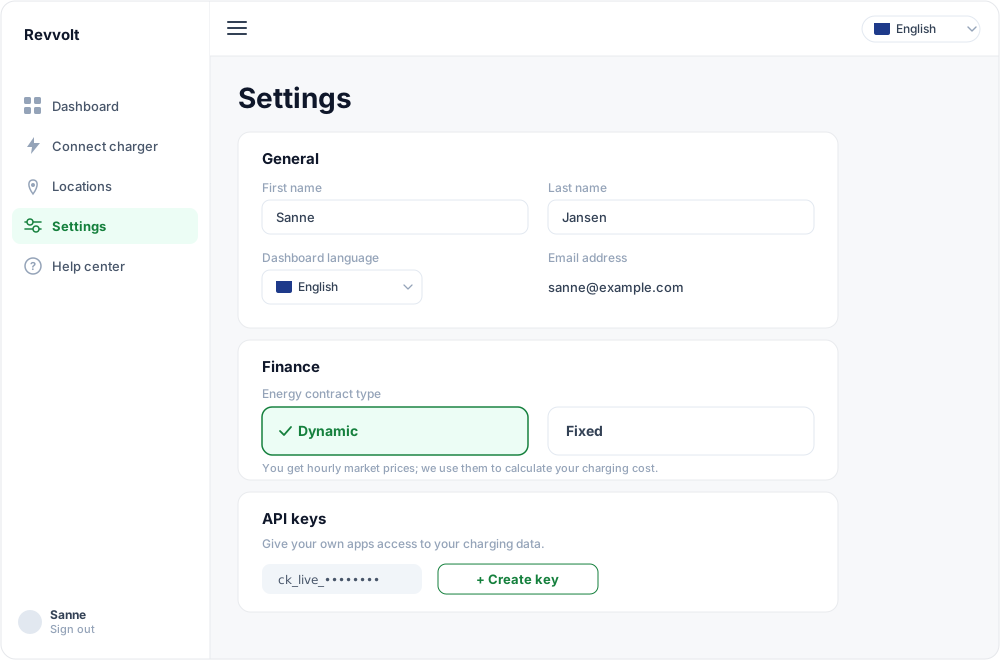
General
- Name — your first and last name. We use it to greet you personally on your dashboard. If we don't have your name yet, we pre-fill it with the name you entered for a location; you can always adjust it here.
- Dashboard language — switch between Dutch and English. Your choice applies immediately.
- Email address — the address you sign in with. Changing it is coming soon.
Finance
Here you set your energy contract. This matters: it determines how we calculate the charging cost on your dashboard.
- Dynamic — your price follows the hourly prices on the energy exchange. We fetch those prices every hour.
- Fixed — you pay a fixed rate per kWh, optionally different per time of day. Add your rates per time range (use the all-in price including taxes).
As long as you set nothing here, the charging-cost and net tiles on your dashboard stay empty. You can also update your energy supplier if you've switched.
Password
Set a new password here. For your own safety we ask you to confirm your current session again.
Two-step verification (2FA)
Secure your account with an extra code from an authenticator app (for example Google Authenticator or 1Password). Scan the QR code, enter the six-digit code and 2FA is on. We strongly recommend it.
API keys
Want to use your charging data in your own tools, such as Home Assistant or a spreadsheet? Create a personal API key. A key grants read-only access to your own data. How that works is described in Accessing your data via the API.
Ready to earn with your charger?
Create a free account — Revvolt handles NEa registration, the sale and the payout of your EREs.